
 Star
Star Documentation
Functions
Write your own tools in JavaScript — declare a function, edit it in the browser or deploy it from the CLI, test it before anyone sees it, and roll back when you need to.
Functions are tools you write yourself. The catalog is a finite guess at what you need; a function is the escape hatch — multi-step logic, a transform, a call to your own API combined with a credential, anything that isn’t one HTTP request or an integration we happen to ship.
Your code runs on Cloudflare’s edge, in an isolate we deploy for you. There is no server to run, no container to build, and no deploy pipeline to wire up. You get the platform’s connected accounts and its file-sending as host capabilities, so your code never handles a refresh token or a 40MB attachment.
Functions are a Pro feature. On Free the tab shows what it would give you and points at HTTP Endpoints, which needs no code.
The tab
Everything about a function lives on one tab: declare it, edit it, test it, deploy it, and go back to a version that worked.
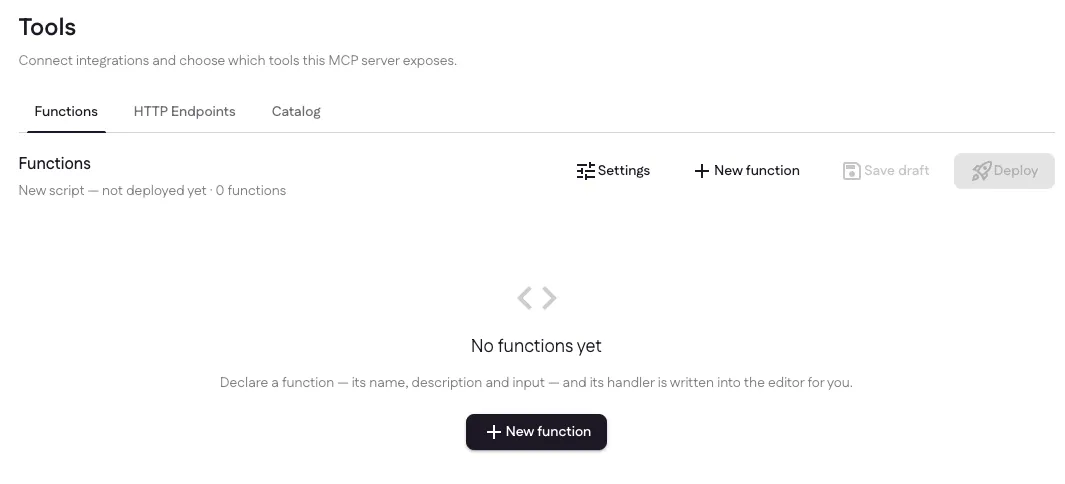
Four controls sit across the top, and they stay in that order as the script grows:
- Settings — what your code may reach: connections, secrets, allowed hosts, timeout, resource access.
- New function — declare a tool.
- Save draft — store your code as a new version. Nobody sees it.
- Deploy — publish the open version. This is what changes what your MCP clients and channels can call.
Saving and exposing are separate acts, which is the whole point of two buttons.
⌘S saves a draft.
Declare a function
Select New function and describe the tool the way the model will see it.
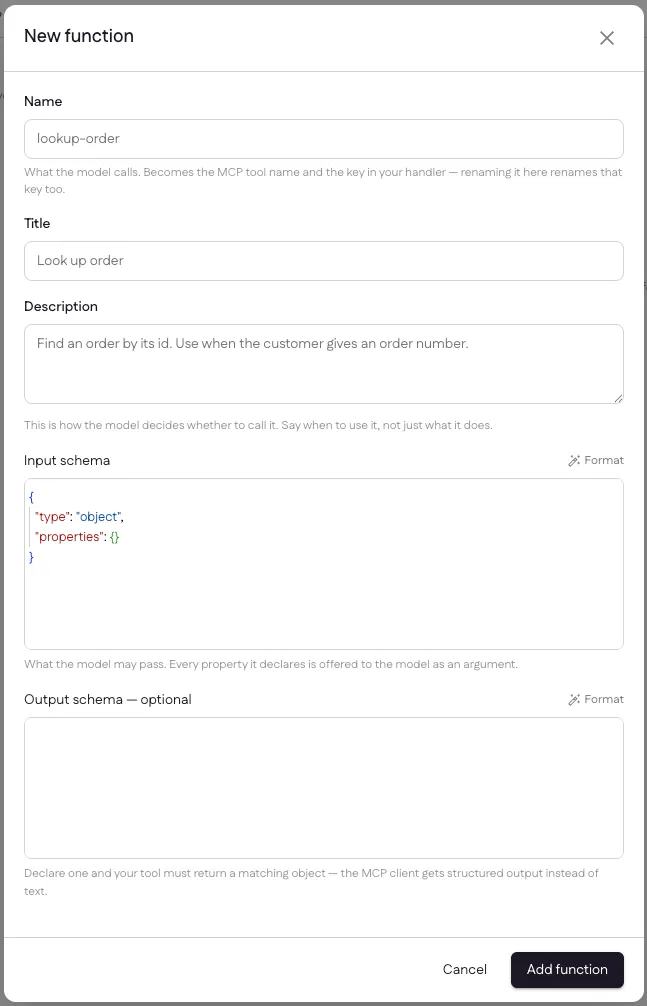
| Field | What it’s for |
|---|---|
| Name | What the model calls, e.g. lookup-order. It becomes the MCP tool name and the key in your handler — renaming it here renames the key in your code too. |
| Title | The human-readable label. |
| Description | How the model decides whether to call it. Say when to use it, not just what it does — this is the single highest-leverage field on the form. |
| Input schema | JSON Schema. Every property it declares is offered to the model as an argument. |
| Output schema | Optional. Declare one and your tool must return a matching object; the MCP client then gets structured output instead of text. |
Both schema fields are real editors with JSON Schema validation, so a missing
quote or a "type": "date" is underlined where it is rather than coming back as
an error after you save.
Adding the function writes the handler stub for you. The tool name and the handler key are two spellings of the same thing, and getting them out of step is a deploy that fails on every call — so the dialog writes both:
/** @type {import('./ganju-sdk.js').ToolHandler<{ orderId: string }>} */
const lookupOrder = async (input, ctx) => {
  ctx.log('lookup-order called');
  return { ok: true };
};

export default createHandler({
  'lookup-order': defineTool(lookupOrder)
});
The input type is generated from the schema you just declared, so input.orderId
autocompletes and a property nobody declared does not.
The editor
The editor is Monaco — the one VS Code is built on — served from this site rather than a CDN, and loaded only once there is something to edit.
ctx autocompletes from the SDK’s real type declarations, so hovering a method
shows the same documentation you would see in a local editor. A marker pass flags
things that exist in a browser but not in a Worker (localStorage, process,
require), plus eval and any import that isn’t one of your own files — each
with the reason and the way around it.
The file you write is deployed exactly as typed. There is no build step between the text box and the running Worker, which is why the language is JavaScript: type annotations would reach the runtime as syntax errors. Type checking still runs, against the SDK’s types and whatever JSDoc you write.
A script is a set of files. The explorer beside the editor is the whole project —
create folders, rename, delete, navigate with the arrow keys. Two files are
special: index.js is the module we call and can’t be renamed or removed, and
ganju-sdk.js is attached to every deploy and shown dimmed, because it is part
of the honest answer to “what is in my script”.
What your code can do
Every handler is called with the model’s arguments and a ctx object:
ctx member | What it gives you |
|---|---|
ctx.connection(provider) | A short-lived access token for a connected account. Never the refresh token — those stay server-side. |
ctx.secret(name) | An API key you stored in Settings, resolved at call time. |
ctx.resources.search / read / list | The same knowledge base your assistant answers from. |
ctx.resources.create / delete | Write a file or a note back onto the project. Not searchable unless you ask for it with index: true. |
ctx.sendFile(opts) | Email or post a resource as a real attachment, through Gmail, Outlook or Slack. The bytes never pass through your code. |
ctx.log(...) | Shows up in the test panel and in ganju logs. |
fetch | The global you already know, screened on the way out. |
ctx.sendFile is the one thing your code genuinely could not do itself: a Worker
is capped at 128MB and has no path to storage, so large attachments and uploads
stay a platform capability rather than something you reimplement.
Settings
Settings is what your code may reach, and what it is allowed to spend doing it. None of it lives in your code, deliberately — a limit the code can widen is not a limit.
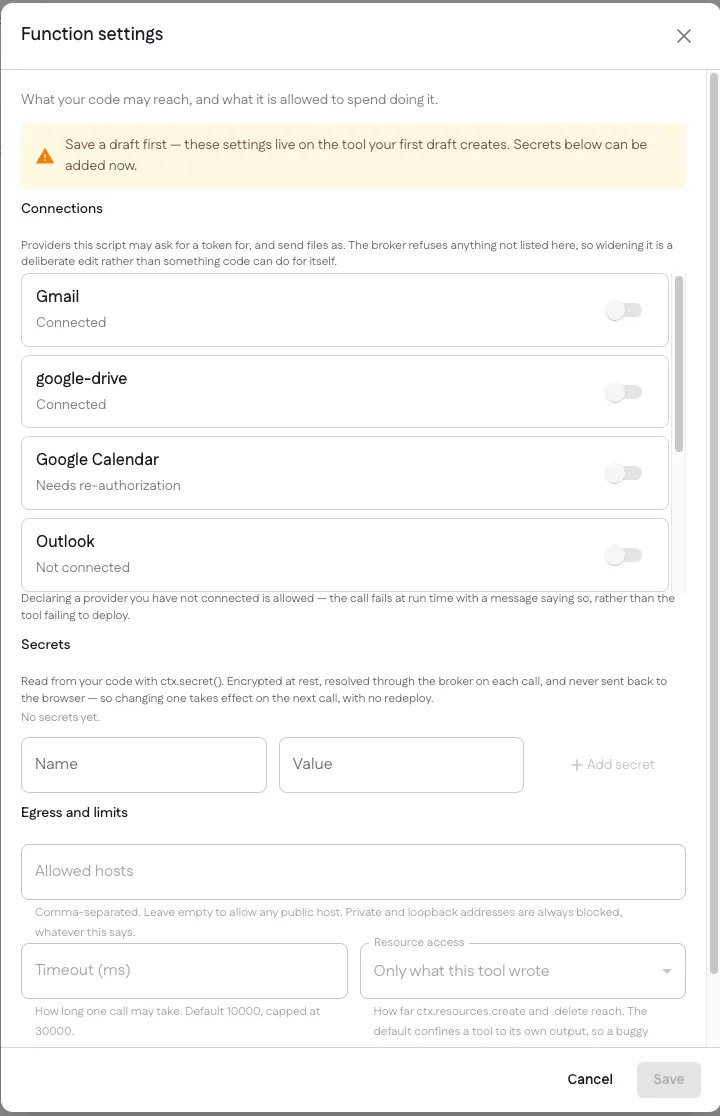
- Connections — the providers this script may ask for a token for, and send files as. Anything not switched on here is refused at run time. Declaring a provider you haven’t connected yet is fine: the call fails with a message saying so rather than the tool failing to deploy.
- Secrets — the values
ctx.secret()reads. Encrypted at rest, resolved through the broker on each call, and never sent back to the browser. Changing one takes effect on the next call, with no redeploy. - Allowed hosts — a comma-separated allowlist for outbound requests. Empty means any public host, not none. Private and loopback addresses are always blocked, whatever this says.
- Timeout — how long one call may take. Default 10,000ms, capped at 30,000.
- Resource access — how far
ctx.resources.createand.deletereach. Only what this tool wrote is the default and the safe floor; the other setting lets a tool replace and remove uploaded and crawled resources too, which is what a tool whose job is pruning a stale crawl actually needs.
The two halves save differently, and look like it. Capabilities save together behind one button; a secret acts the moment you add or remove it, because that is what actually happens.
Test before anyone sees it
Every function row expands to its schemas and a Run button.
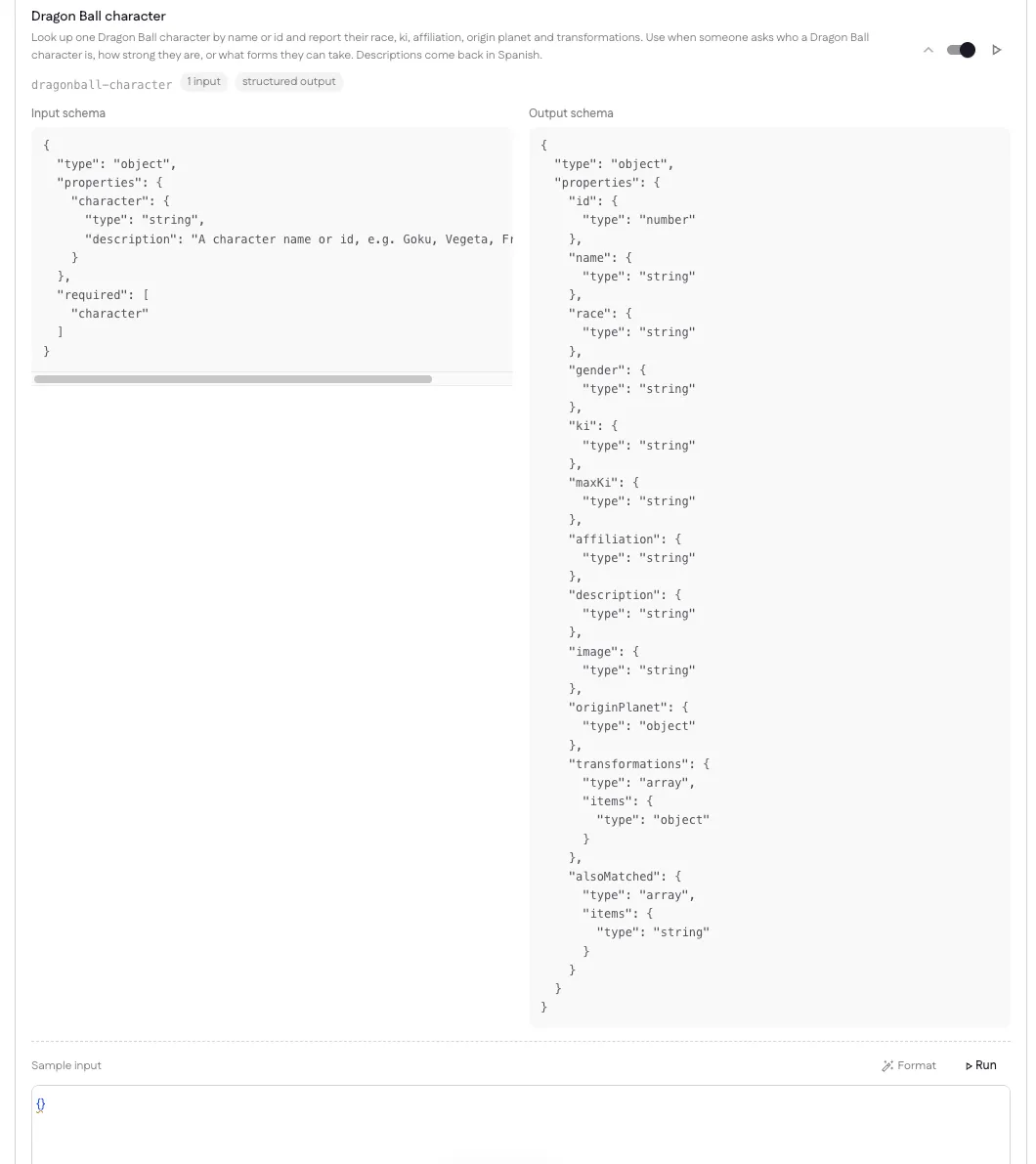
A test run deploys the version to a preview script nothing dispatches to, calls it once, and deletes it. That means it runs the real thing — real connections, real secrets, real egress rules — while your live version keeps serving clients throughout.
You get back the output, your ctx.log lines, the error if there was one, and
how long it took. The sample input is checked against your own input schema
before the run, and the result against your output schema after it, because those
are exactly the two ways a real call fails.
Test runs count toward your monthly tool calls, the same as any other call into your code.
Versions, deploying and rolling back
A version is the unit of both code and contract: the tool names your clients see come from that row, not from the running script. That is what makes rollback safe — going back takes the schemas with it.
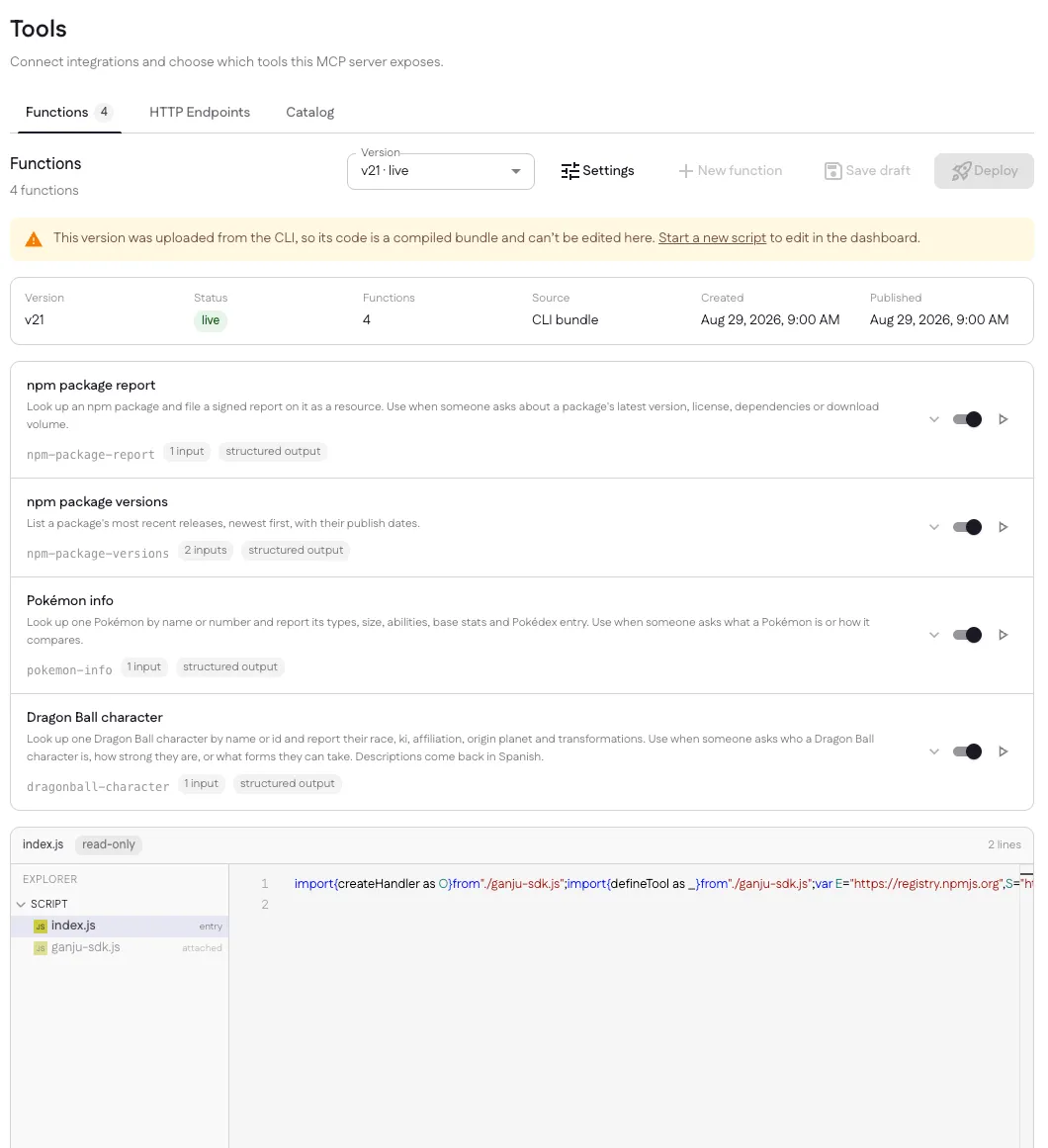
The header states which version is open, its status, how many functions it has, whether the source came from the editor or the CLI, and when it was created and published. History is a picker, not a list — choose any version and its code opens. Deploy publishes what is open; a published version that isn’t the live one offers Roll back instead.
Each function row also carries a switch. Turning one off narrows what the server exposes without a redeploy — useful when a long tool list is costing you tokens on every model call — and your code is untouched. The manifest is what your code can do; the switches are what the server currently offers.
A version uploaded from the CLI is a compiled bundle, so the editor shows it read-only rather than inviting you to overwrite a real build with the contents of a text box. You can still read it, and still roll back to it.
The CLI
Everything above has a terminal equivalent. ganju is a client of the same
endpoints the dashboard uses — not a second way in — so the two write to the same
rows and the choice between them is about where your tools live, not what they
can do. Reach for it when your tools belong in a repository, in code review, and
in a pipeline.
npm install -g @ganju/cli

ganju init my-tools
cd my-tools
ganju login          # opens your browser, signs in on this machine
ganju link           # point the project at an organization and project
ganju deploy         # build, upload, publish
A project is one ganju.json — the tools it exposes plus the four settings the
Settings dialog writes, so code and the permissions it needs are reviewed
together — and one handler file per tool. ganju test, ganju logs,
ganju versions and ganju rollback do from a terminal what the panels above do
in the browser, and ganju token create mints a credential CI can deploy with.
A CLI upload is a compiled bundle, which is why the dashboard shows it read-only rather than inviting you to overwrite a real build with the contents of a text box. You can still read it there, and still roll back to it.
→ ganju CLI — install, every command, ganju.json,
the two router shapes, secrets, signing in, and deploying from CI.
Limits and cost
- Per call: 5 seconds of CPU, and your configured timeout for wall-clock.
- Per minute: 60 calls per tool.
- Per month: 1,000,000 tool calls included on Pro, then $5 per million. Only calls into your own code count — the integrations we ship and remote MCP servers you proxy stay bundled.
- Outbound requests are screened: private, loopback and link-local addresses are always refused, and your allowed-hosts list applies on top.
Next
ganjuCLI — the same work from a terminal, and from CI.- Examples — five ready-to-deploy projects, one per
ctxcapability. - HTTP Endpoints — when one request is all you need, and no code.
- Catalog — the integrations we ship.
Last updated